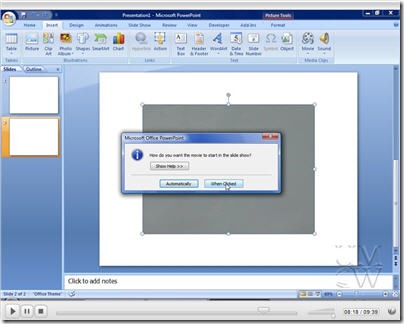
As I promised in my screencast on Embedding (live) YouTube Videos In PowerPoint, here is a video demonstrating how to download a video from YouTube, convert it, and insert it into a PowerPoint slide. I’ll be using my old friend Riva FLV Encoder to convert the downloaded FLV into an MPEG1 video file. This is a format that is compatible with the insert video function in PowerPoint. You cannot directly embed an FLV file in PowerPoint (maybe someday?), at least not easily.
It’s a little less than 10 minutes, and the main video is about an 8MB download. So without further delay, here is the screencast entitled Embed YouTube Video in PowerPoint Offline .


10 Responses
Here is another tip of inserting YouTube video to PowerPoint.
http://www.ppt-to-dvd.com/forum/viewtopic.php?t=2445
Thanks, Andy. You’ve once again inspired me to try to do this too, and as serendipity would have it, a recent issue of CPU magazine devoted an entire article to downloading and converting YouTube flv files into other formats.
So I got the Riva encoder and it works exactly as described. A lovely little format-switcher for the toolkit. The CPU article also described an online flv-to-other-formats converter at Media-Convert.com. The article said the results were bigger files but also better-looking video than what Riva produces, so I gave it a try, and they were right. It’s still nice to have a client on the desktop, but the web service Media-Convert provides is pretty sweet–and it’s free, too.
By the way, MS says it supports .avi in PowerPoint, but I get a black screen–sound, but no video. Mpg works fine. Any clues?
Gardner – Another online converter is at zamzar.com. Pretty much the same deal – bigger file but better quality.
As for the .avi that Riva produces, it seems to be an mpeg4 variant that ffmpeg produces (fmp4). It’s still not decoding on my Vista machine, but you may have better luck on an XP machine. I don’t think the quality difference will warrant the extra work. You need to go download a CODEC to make it go.
Good sharing.
Here is another topic about how to embed YouTube video into PowerPoint.
http://www.ppt-to-video.com/knowledges/embed-youtube-powerpoint.html
And we can also upload a PowerPoint to YouTube.
Tutorial:
http://www.ppt-to-video.com/blog/how-to-view-powerpoint-on-youtube.html
🙂
Please note that Acoolsoft links to software called “Apowersoft YouTube to PowerPoint Converter”,which I have not tested. Our aim was for users to employ a free solution.
i usually follow these steps:
1.to download Youtube video with the free software Leawo Free YouTube Download
(which can be found at http://leawo.com/youtube-download/)
2.then convert the Youtube video to avi format with
Leawo Free AVI Converter
(which can be found at http://leawo.com/video-converter/free-aviconverter.html)
3.insert the avi video into PowerPoint
Step 1: On the Insert tab, point to Movies and Sounds, and then click Movie from File.
Step 2: Click the video you want to use and then click OK.
Step 3: After you click OK, you’ are promoted with a message asking how you want the movie to start in the slide show. I recommend you choosing “Automatically “even if you want the movie to play when clicked. And that’s done.
Tips:
1. This is the easiest way to insert a video.
2. When playing the video that is inserted in this way in the PowerPoint, it only shows the video picture, and only has two control options: play or stop. So you can’t select the playing time freely
3. Only video in formats of AVI, MPEG and WMV can be inserted in this way
4. Always put the movie in the same folder as your PowerPoint presentation.If you later move the PowerPoint presentation to another computer, copy the movie too. Keeping your movie in the same folder as your presentation ensures the link will still work. However, you should always test the movie on a new machine just to be certain. Re-insert the movie, if necessary.
Okay here’s an interesting dilemma. I am working on a powerpoint for a speech at school. There was this whole shpeal given on how amazing Zamzar is. My teacher had an assistant there that day that knew how to fix problems with Zamzar if the video either had no sound or no picture or simply if the video didn’t play at all.
Here’s the issue: She said that he’d only be there that day and she didn’t know how to fix problems so we’d have to take advantage of him for that day and find our videos. She didn’t think of one thing though. Most of us, we were told, are going to end up getting our videos on YouTube. YouTube is blocked by the district so we were at a bit of a loss. Now I’m sitting at home tinkering with a video that has no picture but the sound plays fine and I have to give a speech about this topic that I have chosen in two days. My grade is toast and I will fail this course if this stupid video doesn’t work.
So the question is: what is it that this man knew that is so vital to fix my video? How do you fix this problem
Urgent help is needed.
Thanks
Giselle – see the 2.0 version of this post – https://andheblogs.andyrush.net/embed-youtube-video-in-powerpoint-offline-v20/